

From Physical Servers to Kubernetes: The Evolution of Networking for DevOps
In the world of modern infrastructure, networking is the invisible thread that holds everything together. Whether you are a Software Engineer, DevOps specialist, or Cloud Architect, understanding how data moves from a user’s browser to your application is fundamental.
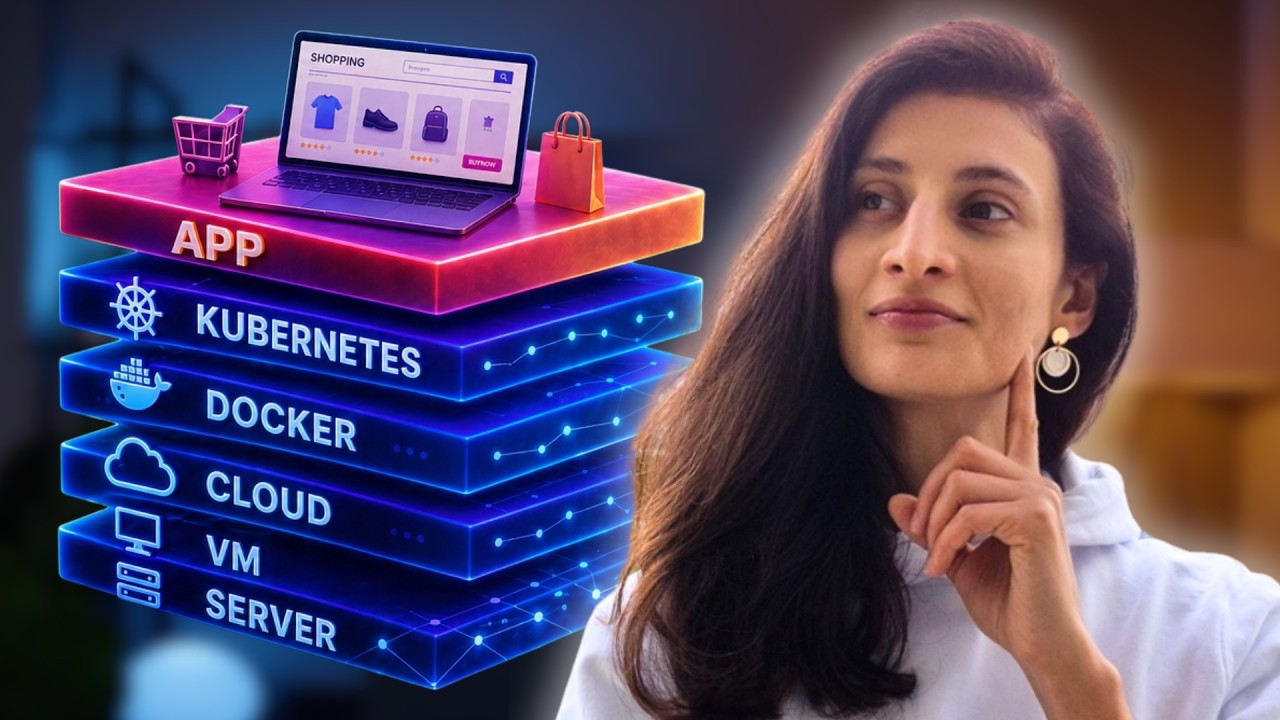
In her latest breakdown, Nana from TechWorld with Nana traces the journey of “Shop Easy,” a fictional e-commerce platform, to explain how networking concepts have evolved alongside our computing power.
1. The Early Days: The Physical Server
In the beginning, “Shop Easy” ran on a single physical server in a data center. To understand this era, you must master the “Street Address” of the internet: The IP Address.
- IP Addresses [01:29]: Just like your home has a unique street address for mail, every server needs a unique IP to be identified on a network.
- The Network Neighborhood [02:22]: A network is a group of devices that can talk directly to each other.
- Routers [03:26]: These act as the “sorting post offices.” When a computer wants to send data outside its own neighborhood, the router directs it across different networks until it hits the destination.
- DNS (Domain Name System) [04:40]: Since humans aren’t great at remembering strings of numbers like
203.0.113.10, DNS acts as the internet’s address book, translatingshopeasy.cominto a machine-readable IP.
2. Inside the House: Interfaces and Ports
Once a request reaches the right “house” (server), it needs to find the right “room.”
- Network Interfaces (eth0) [06:34]: Think of
eth0as the front door of the house. All traffic enters here. - Ports [07:18]: Inside the server, different applications live in different rooms. Your web app might live in Port 80 (the living room), while your database stays in Port 5432 (the basement).
- The OS Manager [07:54]: The Operating System acts as the house manager, checking the “room number” (port) on each incoming package and delivering it to the correct application.
3. The Move to Virtual Machines (VMs)
Running one app on one physical server was wasteful and risky. If the server “caught fire,” the business died. The solution? Virtualization.
- Apartment Living [10:42]: Virtualization turns one big house into an apartment building. Each VM is a self-sufficient, isolated apartment with its own OS and internal IP address.
- Hypervisors [12:14]: This is the building supervisor. It sits between the physical hardware and the VMs, slicing up CPU and RAM to share among the apartments.
- NAT (Network Address Translation) [15:43]: Since internal apartments have private IDs (like
10.0.0.5), the supervisor uses NAT to translate those private addresses into the building’s single public IP when they need to talk to the outside world.
4. Scaling in the Cloud: VPCs and Subnets
As Shop Easy grew, they stopped owning the building and started renting from “Skyscraper Landlords” like AWS or Google Cloud.
- VPC (Virtual Private Cloud) [20:10]: This is your own private, isolated wing in a giant cloud skyscraper.
- Subnets [20:33]: Within your wing, you have Public Subnets (storefronts facing the street) and Private Subnets (secure back offices for databases).
- Security Groups [21:22]: These are security guards stationed at every door, checking “guest lists” (firewall rules) to ensure only authorized traffic enters.
5. The Container Revolution
To move even faster, we moved from “Apartments” to “Toolboxes.” Instead of a whole apartment, a Container is a portable, lightweight box containing only what the app needs to run.
- Docker Bridge [25:39]: By default, containers on the same host talk to each other via a “virtual bridge”—a private hallway with its own internal phone book.
- Port Mapping [27:06]: To let the public reach a container, we map the host’s port to the container’s port (e.g., “Any calls to the building’s Port 80 should go to the Toolbox in Room 8080”).
6. Mastering the City: Kubernetes Networking
When you have hundreds of containers, you need a City Planner. That is Kubernetes.
- The Pod [29:39]: The smallest unit in Kubernetes. Every Pod gets its own unique IP address.
- CNI (Container Network Interface) [30:27]: The “contractor” that automatically plugs a virtual network cable into every new Pod as it’s born.
- Services [32:11]: Since Pods are “ephemeral” (they die and restart with new IPs frequently), a Service acts as a permanent company hotline. You call the hotline, and it finds a healthy Pod for you.
- Ingress [33:46]: The smart receptionist at the cluster’s front door who routes traffic based on the URL or path (e.g.,
shopeasy.com/apigoes to the backend). - Network Policies [35:14]: The ultimate security layer. It allows you to lock specific doors, ensuring the “API room” can talk to the “Database room,” but the “Public Lobby” cannot.
Conclusion: The Fundamentals Never Change
While the tools have moved from physical cables to software-defined mesh networks, the core pillars remain the same [37:22]:
- Addresses: Everything needs an IP.
- Rules: Firewalls and Policies control access.
- Names: DNS and Service Discovery resolve names to IPs.
- Routes: Data needs a path to follow.
Master these four, and you can navigate the complexity of any modern cloud infrastructure with confidence.
For more in-depth DevOps tutorials, check out TechWorld with Nana on YouTube.